
XEROF


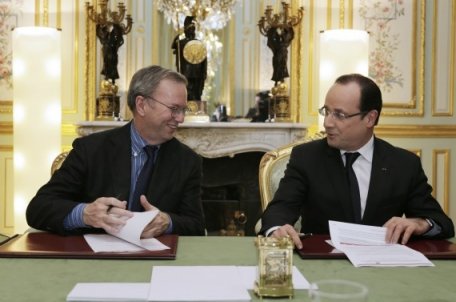
Google versus la France


Hollande annonce un accord historique.

Petit rappel : Hollande est président de la cinquième puissance économique mondiale. Schmidt est un patron de boite américaine, une multinationale comme il y en a tant d'autres.

Que disent ces images ?


Hollande ne donne pas l'impression de tenir le volant.

C'est l'économie de marché.

Schmidt est un représentant du fameux monde de la finance que Hollande était censé combattre, notamment lorsque Schmidt utilise des sociétés écrans dans des paradis offshore et le dumping fiscal Irlandais pour ne payer qu'une goutte d'eau d'impôts en France.

Posted on 02-February-2013 13:43 | Category: France | comment[0] | trackback[0]


Bienvenu les petits moutons dans le cloud!


Le jour où Microsoft annonce sa dernière version de sa plus grosse vache à lait, Office, dont la seule fonctionnalité et le fait de mettre en avant l'utilisation de documents directement hébergés sur internet, Twitter annonce une brêche massive dans leur site, avec pas moins de 250000 comptes corrompus.

Twitter est pourtant sécurisé. Alors quel crédit accorder à Office puisque Office est également sécurisé ?

Les conséquences sont infiniment plus graves car on parle là des documents des entreprises et des particuliers, qui seraient rendus pillables à tout instant de n'importe quel point de la planète avec juste un mot de passe.

Posted on 02-February-2013 13:37 | Category: France | comment[0] | trackback[0]


xlsgen 3.0 build #67 : Transparency


Build 3.0.0.67 of xlsgen adds support for transparency in spreadsheets.

Transparency can be applied to :
  • text boxes
  • pictures
  • vector shapes
  • comments
  • chart elements (XLSX files only due to legacy Excel restrictions)


Transparency in charts (horizontal gridlines not obscured by area and bar elements; area not obscured by bar elements)

Transparency is exposed in the xlsgen object model through a simple FillTransparency property, whose value ranges from 0 (opaque) to 100 (fully transparent).

Here is an example in C++ showing how to set transparency to a chart, producing the chart pictured above. Note that most of the source code is for the chart set up, not the transparency itself :


C/C++ code


xlsgen::IXlsChartPtr chart001s0 = worksheet->NewChart(xlsgen::charttype_bar2D, 4, 5, 18, 10);

xlsgen::IXlsChartDynamicDataSourcePtr datasource001s0 = chart001s0->DynamicDataSource;

xlsgen::IXlsChartDynamicDataSourceSeriesPtr serie001s0ss0 = datasource001s0->AddSerie();
serie001s0ss0->SeriesTitlesFormula = L"Sheet1!$C$2";
serie001s0ss0->SeriesValuesFormula = L"Sheet1!$C$3:$C$10";
xlsgen::IXlsChartDynamicDataSourceSeriesPtr serie001s0ss1 = datasource001s0->AddSerie();
serie001s0ss1->SeriesTitlesFormula = L"Sheet1!$D$2";
serie001s0ss1->SeriesValuesFormula = L"Sheet1!$D$3:$D$10";
chart001s0->Legend->Show = xlsgen::chartlegend_hidden;

chart001s0->MainTitle->Label = L"Chart transparency";

// bar formatting (auto gradient fill, and 94% means we want the 2nd gradient stop almost fully transparent)
chart001s0->SeriesByIndex[1]->Options->Patterns->Area->FillTransparency[1] = 94;

// area formatting (50% means we want the solid area half opaque half transparent)
chart001s0->SeriesByIndex[2]->SeriesType = xlsgen::charttype_area2D;
chart001s0->SeriesByIndex[2]->Options->Patterns->Area->Type = xlsgen::chartareatype_custom;
chart001s0->SeriesByIndex[2]->Options->Patterns->Area->Pattern->PatternStyle = xlsgen::chartareapattern_solid;
chart001s0->SeriesByIndex[2]->Options->Patterns->Area->Pattern->BackgroundColor = 0xFF0000;
chart001s0->SeriesByIndex[2]->Options->Patterns->Area->FillTransparency[0] = 50;


Posted on 02-February-2013 12:50 | Category: xlsgen, Excel generator | comment[0] | trackback[0]


xlsgen 3.0 build #66 : Fix for rendering cells


Build 3.0.0.66 of xlsgen fixes problems related to rendering content in cells. It affects, print, preview, PDF generation and XPS generation.

Better support for word-wrapped, right-aligned content in cells. As well as +90 and -90 rotated text in cells.

Also this build includes additional error return for the workbook.Close() statement. Before this build, Close() would not always return an error depending on the file type being generated, especially when the file being generated is already locked by another process.

Posted on 02-February-2013 12:46 | Category: xlsgen, Excel generator | comment[0] | trackback[0]


<-- previous page

< February >
0102030405
0607080910
1112131415
1617181920
2122232425
262728


This site
Home
Articles

DevTools
CPU-Z
EditPlus
ExplorerXP
Kill.exe
OllyDbg
DependencyWalker
Process Explorer
autoruns.exe
Araxis
COM Trace injection
CodeStats
NetBrute
FileMon/Regmon
BoundsChecker
AQTime profiler
Source monitor
GDI leaks tracking
Rootkit revealer
Rootkit removal
RunAsLimitedUser(1)
RunAsLimitedUser(2)


Liens
Le Plan B
Un jour à Paris
Meneame
Rezo.net (aggr)
Reseau voltaire
Cuba solidarity project
Le grand soir
L'autre journal
Le courrier suisse
L'Orient, le jour
Agoravox (aggr)
