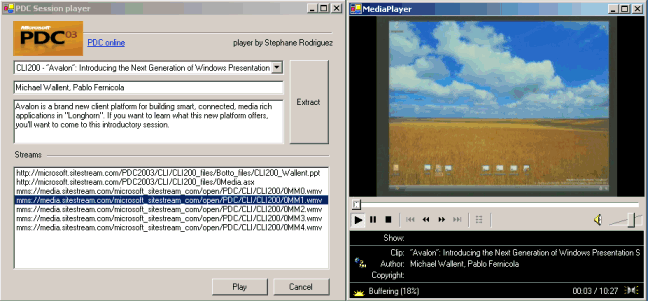
It had to happen right?
The way PDC sessions from last october are being put online is quite frustrating. Even with broadband access, it takes 15 minutes, 30 times and sometimes even up to one hour only for a single session to really start playing.
Before a session really starts, all resources must be gathered. Given the inherent issues of the web, this causes a serious headache when you figure out you are basically wasting so much time.
And why that? Only because the sessions were packaged with MS Producer 2003, which is probably very good for offline presentations as well as CD-based presentations, but clearly is not worth a penny under lower bandwidth networks like the web.
It actually doesn't matter you have broadband or not. I do have broadband and yet I find myself wasting my time only for a presentation to start. And when it starts you have to pray that no network congestion occurs otherwise you might have to redo all the preloading over again. The Play/Pause/Stop buttons don't seem to work well either : sometimes it just aborts and you end up nowhere.
I thought that would be nice and convenient to come up with a tool that gives direct access to the actual streams. In fact, this tool lets you choose one of the sessions, along with speakers and descriptions. Then when you click Extract, it grabs the MS Producer 2003 package descriptors and reproduces the actual streams from the session. When this is done, all you have to do is double-click on the streams, and there you go!
This way of watching the shows is incommensurable different. Just try it.
Basically the player exactly reproduces the sessions available from the following site : http://microsoft.sitestream.com/PDC2003/Default.htm :
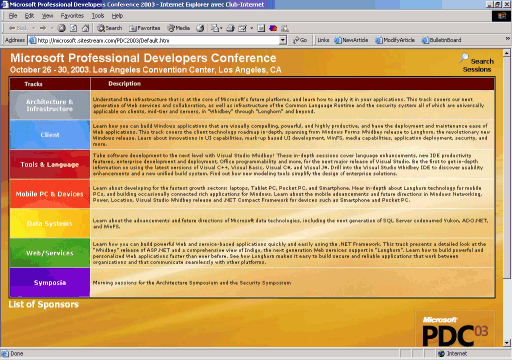
When you click a category, you can choose a session based on whether it's client (CLI), data (DAT), and so on, as in :
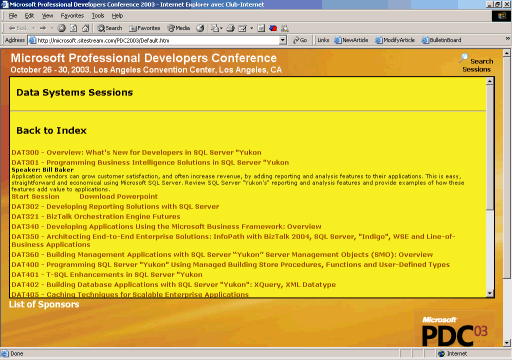
In fact, the hierarchy of sessions is xml-based and defined in this xml file : http://microsoft.sitestream.com/PDC2003/images/Sessions.xml, whose structure can be described as follows :
<?xml version="1.0" encoding="utf-8" standalone="yes"?>
<document>
  <row>
    <SessionID>ARC200</SessionID>
    <SessionTrack>Architecture and Infrastructure</SessionTrack>
    <SessionTitle>.NET Framework Overview: A Roadmap</SessionTitle>
    <Speakers>Brad Abrams, Jeff Richter</Speakers>
    <Description>Get a high level overview of the .NET Framework with a special emphasis on the new enhancements in the platform and understand the roadmap from v1 to "Whidbey" and "Longhorn" releases. This is a must attend session for anyone that is new to the .NET Framework or is interested in knowing the future directions for the Framework. The .NET Framework is a platform for building, deploying, and running client, Web-based and distributed XML Web Services. It consists of two main parts: the common language runtime and a unified set of class libraries that includes ASP.NET, ADO.NET, and Windows Forms. Get an overview of the Framework giving developers the information they need to write great .NET Framework based applications today and in the future.</Description>
    <PPTDeck>ARC200_Abrams.ppt</PPTDeck>
    <Disk>Net</Disk>
    <Dir>PDC2003/ARC</Dir>
    <Materials/>
  </row>
  <row>
	  ..
  </row>
 </document>
If you need to show the session descriptors in some UI, which I did for this Winforms-based player, you only need to grab the content once (or anytime the player is started, which I didn't find relevant enough) then use the XmlTextReader xml parser to serialize Session classes you will pick data from later.
(error checking omitted for brievety)
System.Xml.XmlTextReader reader = null;

reader = new System.Xml.XmlTextReader(szLocation);

_Sessions = new ArrayList();

String currentNodeName = null;
Session currentSession = null;

//Parse the file and display each of the nodes.
while ( reader.Read() )
{
  switch ( reader.NodeType )
  {
    case System.Xml.XmlNodeType.Element:
      currentNodeName = reader.Name;
      if (currentNodeName == "row")
      {
        currentSession = new Session();
        _Sessions.Add( currentSession );
      }
      break;
    case System.Xml.XmlNodeType.Text:
      if (currentSession != null)
        currentSession.SetProperty(currentNodeName, reader.Value);
      break;
  }
} // end while
What happens when you click Extract is a bit less simple as it directly dives into the maze of MS Producer 2003 packages.
A sequence of streams are not just described in a simple xml file like above. With MS Producer 2003, programmers seem to have gone so much nuts that they wanted to come up with a purposed maze of javascript libraries (over 200kb of cross-referencing script code), which in turn reference a lot of other resource files. I can't think about this is not done on purpose (or else I think a couple people out there need a serious bashing). So before you end up knowing what the actual sequence of streams is made of, you'll have to spend a few hours.
A few hours only to come up with the fact that, other than loading the TOC, the sequence is basically a Windows Media ASX file which in turn holds the sequence of small streams, whether they are pure speech, a live demo, etc.
I won't explain the pinning, just come up instead with the final ASX file to worry about. If the session you are interested in is DAT301 for instance, then the ASX file is at this URL : http://microsoft.sitestream.com/PDC2003/DAT/DAT301_files/0Media.asx
And below is the typical content of such a file :
<ASX version = "3.0">
<!-- Producer-generated file -->
  <ENTRY>
    <REF HREF="mms://media.sitestream.com/microsoft_sitestream_com/open/PDC/ARC/ARC200/0MM0.wmv"/>
  </ENTRY>
  <ENTRY>
    <REF HREF = "mms://media.sitestream.com/microsoft_sitestream_com/open/PDC/ARC/ARC200/0MM1.wmv"/>
  </ENTRY>
  <ENTRY>
    <REF HREF = "mms://media.sitestream.com/microsoft_sitestream_com/open/PDC/ARC/ARC200/0MM2.wmv"/>
  </ENTRY>
  <ENTRY>
    <REF HREF = "mms://media.sitestream.com/microsoft_sitestream_com/open/PDC/ARC/ARC200/0MM3.wmv"/>
  </ENTRY>
  <ENTRY>
    <REF HREF = "mms://media.sitestream.com/microsoft_sitestream_com/open/PDC/ARC/ARC200/0MM4.wmv"/>
  </ENTRY>
  <ENTRY>
    <REF HREF = "mms://media.sitestream.com/microsoft_sitestream_com/open/PDC/ARC/ARC200/0MM5.wmv"/>
  </ENTRY>
  <ENTRY>
    <REF HREF = "mms://media.sitestream.com/microsoft_sitestream_com/open/PDC/ARC/ARC200/0MM6.wmv"/>
  </ENTRY>
</ASX>
And there you can see all streams. Those streams are served by a Windows media server, so you can't directly download the streams offline and play them afterwards. But at least you have a direct access to the streams, which is what I use in the player : I add those entries in the listbox, and when you double-click or click Play then the stream starts. It's just that simple. If you want to play the whole session, then double-click on the 0Media.asx file instead. Don't forget that, even if the urls are quite lengthy, you can still resize the winforms.
Regarding streams, experienced guys know by now that even though they can't be downloaded with Windows Media, they actually can be grabbed using a dedicated tool. I won't name one here, for obvious reasons. But heh, now you know what you might do with it. :-)
Enjoy!
System requirements:
Stéphane Rodriguez - Dec 16, 2003. Last updated on Jan 2, 2004.